Finding the right search terms is one of the most important parts of SEO, but you do not always need an expensive subscription to start. A good free keyword research tool can help you discover topics, question-based searches, related phrases, long-tail opportunities, and, in some cases, search-volume or competition data.
The important distinction is that “free” does not mean every platform offers unlimited access or the same type of data. Some tools work immediately with no account, some provide a limited number of searches, and others are best used as supporting research sources rather than complete SEO platforms.
This guide compares 11 options available in 2026, focusing on practical usefulness, free access, sign-up requirements, keyword data, and the type of research each tool is best suited for.
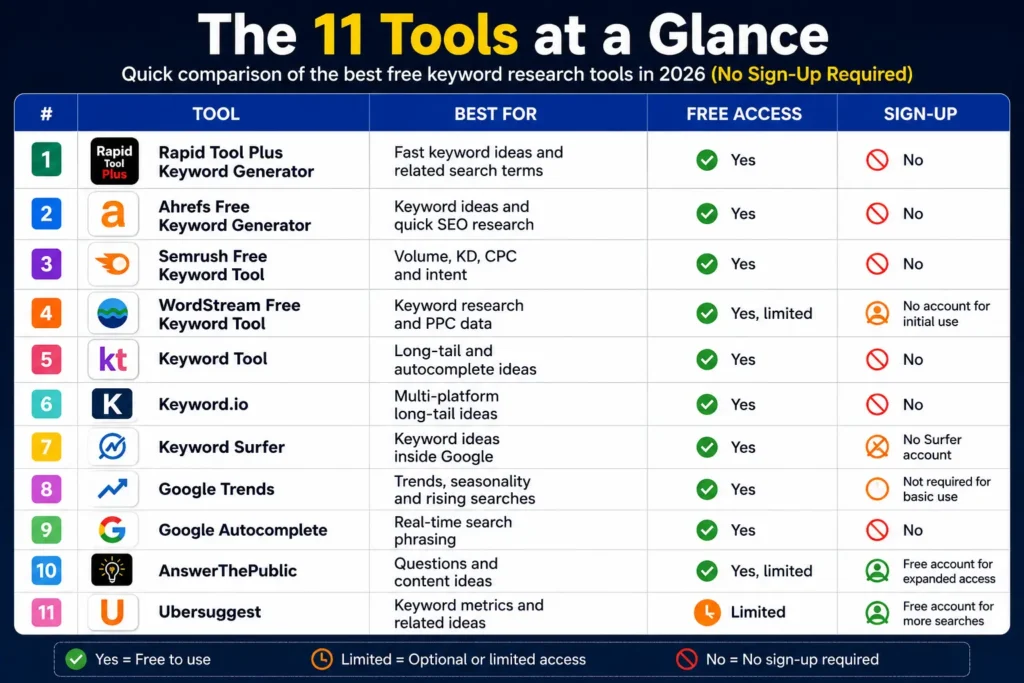
The 11 tools at a glance
| Tool | Best for | Free access | Sign-up |
| Rapid Tool Plus Keyword Generator | Fast keyword ideas and related search terms | Yes | No |
| Ahrefs Free Keyword Generator | Keyword ideas and quick SEO research | Yes | No |
| Semrush Free Keyword Tool | Volume, KD, CPC and intent | Yes | No |
| WordStream Free Keyword Tool | Keyword research and PPC data | Yes, limited | No account for initial use |
| Keyword Tool | Long-tail and autocomplete ideas | Yes | No |
| Keyword.io | Multi-platform long-tail ideas | Yes | No |
| Keyword Surfer | Keyword ideas inside Google | Yes | No Surfer account |
| Google Trends | Trends, seasonality and rising searches | Yes | Not required for basic use |
| Google Autocomplete | Real-time search phrasing | Yes | No |
| AnswerThePublic | Questions and content ideas | Yes, limited | Free account for expanded access |
| Ubersuggest | Keyword metrics and related ideas | Limited | Free account for more searches |
The list intentionally separates completely open tools from freemium tools so readers know what to expect before using them.
1. Rapid Tool Plus Keyword Generator
Best for: Quickly generating keyword ideas and related search terms without creating an account.
Rapid Tool Plus offers a dedicated keyword generator for turning a seed topic into useful keyword variations. It can be a practical first step when you want to expand a topic before checking search volume, keyword difficulty, search intent, and SERP competition in other tools.
For example, if your seed keyword is keyword research, you can use the generator to discover related phrases such as:
- free keyword research tool
- keyword research for beginners
- best keyword generator
- keyword research software
- long-tail keyword research
- keyword research for websites
The tool is especially useful for content writers, bloggers, marketers, and small businesses that need quick keyword inspiration without navigating a complex SEO dashboard.
Why use it:
- Fast keyword idea generation
- Useful related keyword variations
- Suitable for content planning
- Helpful for expanding seed topics
- Convenient starting point before metric validation
Best use case: Enter a broad topic, collect relevant keyword variations, and then validate the strongest ideas using Google Search, Google Trends, Ahrefs, Semrush, or another keyword research platform.
Rapid Tool Plus is a strong option for readers looking for a free keyword generator, keyword generator tool, or simple keyword research tool for initial SEO planning.
2. Ahrefs Free Keyword Generator
Best for: Quick keyword discovery without creating an account.
Ahrefs’ Free Keyword Generator is one of the strongest starting points when you need ideas quickly. Its current public tool lets users search Google, Bing, YouTube, or Amazon and provides keyword suggestions from Ahrefs’ large keyword database.
It can generate several types of ideas, including phrase-match terms, questions, search suggestions, and keywords that top-ranking pages also rank for. That makes it useful for turning one broad seed into a larger research set.
Why use it:
- No login required for the public generator
- Useful keyword variations
- Supports multiple search platforms
- Includes estimated search-volume data
Best use case: Start with a seed such as “keyword research,” “home insurance,” or “running shoes,” then use the results to build your first shortlist.
3. Semrush Free Keyword Tool
Best for: Quick competitive keyword evaluation.
Semrush’s free Keyword Tool is useful when you want more than ideas alone. The current free version provides a limited set of broad-match keyword suggestions with metrics such as search volume, keyword difficulty, CPC, and intent. Semrush states that the free tool can be used without creating an account.
That makes it useful for deciding whether a phrase is worth investigating before moving to a larger paid workflow.
The broader Semrush platform also provides a Keyword Overview report with search volume, intent, CPC, competition information, trends, SERP features, and ranking results.
Why use it:
- Search volume
- Keyword difficulty
- CPC
- Search intent
- Quick competitive context
Best use case: Use it to evaluate a shortlist rather than trying to build an enormous database from one free query.
It can also serve as a practical semrush free alternative for people who only need a small amount of keyword data.
4. WordStream Free Keyword Tool
Best for: SEO and PPC research, especially for users who care about commercial data.
WordStream’s Free Keyword Tool can generate hundreds of keyword results and provides data such as Google search volume, competition, CPC, and opportunity scoring. Its current documentation says the tool can also use an industry and country filter to make the results more relevant.
WordStream also explains that its free tool can be used for long-tail research, negative keyword discovery, keyword grouping, and website keyword analysis.
There is an important limitation: WordStream’s current FAQ says the free tool can be used 10 times initially and then once per day for free, while unlimited use belongs to the paid product.
Why use it:
- Search volume and CPC
- Competition data
- Industry filtering
- Useful for both SEO and PPC
- Website-based keyword discovery
Best use case: Businesses researching keywords with commercial intent or paid-search potential.
5. Keyword Tool
Best for: Long-tail keyword ideas from autocomplete.
Keyword Tool is particularly useful when the main goal is discovering phrases rather than obtaining a full set of SEO metrics.
Its current free offering says it can generate 750+ long-tail keyword suggestions for a search term without requiring an account. The platform relies heavily on autocomplete data and supports research across platforms such as Google, YouTube, Amazon, Bing, TikTok, and others.
The free version is intentionally focused on inspiration; search volume and CPC data belong to the paid subscription.
Why use it:
- No account required
- Strong long-tail discovery
- Multiple platforms
- Fast autocomplete-based research
Best use case: Content writers who already have a topic but need dozens or hundreds of ways people may phrase it.
6. Keyword.io
Best for: Multi-platform keyword discovery.
Keyword.io takes a broader approach to autocomplete research. Its current site says it can find long-tail keywords from more than 11 sources, including Google, Amazon, YouTube, Bing, eBay, Wikipedia, TikTok, and other platforms. It also states that the tool is free, works without sign-up, and allows users to export keyword lists.
This is useful when your SEO strategy goes beyond traditional Google search.
For example, an ecommerce business might research a product on Google and Amazon, while a content creator could compare search language across Google, YouTube, and TikTok.
Why use it:
- Multi-platform research
- Long-tail discovery
- No signup
- Exportable keyword lists
Best use case: Finding audience language across several search and discovery platforms.
7. Keyword Surfer
Best for: Keyword research directly inside Google Search.
Keyword Surfer is a free Chrome extension from Surfer. Its current documentation says the extension is available to anyone and does not require a Surfer account. It provides keyword suggestions and search-related information while browsing Google results.
Its biggest advantage is workflow. Instead of switching between a search engine and another research dashboard, you can investigate keywords while examining the actual SERP.
That makes it particularly useful when you are already checking:
- Search results
- Competing pages
- Related queries
- Content topics
- Keyword variations
Best use case: On-page research and quick SERP analysis while planning content.
8. Google Trends
Best for: Understanding whether search interest is rising, falling, seasonal, or geographically different.
Google Trends is not a traditional keyword database, but it can be one of the most useful free research sources.
Google Trends lets you compare search interest over time, across countries and regions, and between related topics. Its current help documentation also provides “Top” and “Rising” related searches, with “Rising” queries showing the strongest growth during the selected period.
The platform also provides a current “Trending Now” experience for exploring searches that are spiking.
This is especially helpful when a keyword has strong seasonality.
For example, a topic may appear attractive based on annual search volume, but Google Trends may reveal that most interest arrives during only a few months.
Best use case: Trend validation, seasonal planning, market research, and comparing keyword topics.
9. Google Autocomplete
Best for: Discovering real search phrasing.
You do not need a dedicated website to begin keyword research. Google Search itself can be a powerful source of ideas.
Google explains that Autocomplete predictions reflect real searches and can be influenced by factors including common and trending queries, language, location, and search history.
For example, typing:
free keyword
may reveal searches such as:
- free keyword research tool
- free keyword search tool
- free keyword generator
- free keyword tool
The important limitation is that Autocomplete is a prediction system, not a monthly-volume report. Google specifically notes that Autocomplete should not be confused with Google Trends.
Best use case: Finding natural wording and generating long-tail research ideas before validating them elsewhere.
10. AnswerThePublic
Best for: Question-based keyword research and content planning.
AnswerThePublic is especially useful when your content strategy depends on understanding what questions people ask around a topic.
Its current 2026 documentation says the free version allows up to three searches per day and provides reports covering keyword wheels, questions, comparisons, related searches, social media, shopping, and People Also Ask data. Search-volume and CPC information are more limited on the free plan.
This makes it valuable for content teams that want to move from a broad keyword into actual article angles.
For the seed phrase keyword research, you may discover questions around:
- how keyword research works
- how to find keywords
- why keyword research matters
- how to choose keywords
- what makes a good keyword
Best use case: Blog planning, FAQ research, topical expansion, and understanding question-based intent.
11. Ubersuggest
Best for: Beginners who want keyword metrics alongside idea generation.
Ubersuggest offers keyword suggestions, estimated search volume, SEO difficulty, and related keyword ideas. Its current public interface allows limited use without registration, while creating a free account unlocks three daily searches.
That makes it a useful option for users who want a more traditional keyword-research interface but are not ready to pay for a larger platform.
Because the free usage is limited, it works best when you already have a focused list of seed keywords.
Best use case: Small websites and beginners who want basic metrics without immediately subscribing to an enterprise SEO platform.
Which free keyword research tool should you choose?
There is no single best keyword research tool for every situation.
The right choice depends on what you need from the research.
| Your goal | Recommended tool |
| Need fast keyword ideas | Rapid Tool Plus Keyword Generator |
| Need keyword ideas immediately | Ahrefs Free Keyword Generator |
| Need KD, volume and intent | Semrush Free Keyword Tool |
| Need SEO + PPC data | WordStream |
| Need lots of long-tail ideas | Keyword Tool |
| Need multi-platform suggestions | Keyword.io |
| Want keyword research inside Google | Keyword Surfer |
| Need trend and seasonality information | Google Trends |
| Want natural search phrasing | Google Autocomplete |
| Need question-based content ideas | AnswerThePublic |
| Want beginner-friendly metrics | Ubersuggest |
The strongest workflow may actually combine several tools instead of trying to find one platform that does everything.
A free keyword research workflow that actually works
The biggest mistake beginners make is assuming that the first keyword list they receive is the finished research.
A better process is:
Start with a seed
Begin with a broad topic such as:
keyword research
This is your starting point rather than necessarily your final target.
Expand the topic
Use Rapid Tool Plus, Ahrefs, Keyword Tool, Keyword.io, Google Autocomplete, or AnswerThePublic to find variations.
You might discover:
- keyword research tools
- keyword research for beginners
- how to do keyword research
- competitor keyword research
- long-tail keyword research
- keyword research for websites
Check demand and competition
Now move to tools that provide metrics.
Look at:
- Search volume
- Keyword difficulty
- CPC
- Search intent
- Trend direction
- SERP competition
Do not choose a phrase just because it has the highest volume.
Study the actual SERP
Search your shortlisted terms in Google.
Look carefully at the pages currently ranking.
Are they:
- Tutorials?
- Tool pages?
- Comparisons?
- Product pages?
- Category pages?
- Videos?
- Forums?
This helps you understand what type of content matches the query.
Compare commercial value
A keyword with relatively moderate volume may have greater business value than a huge informational phrase.
For example:
how to choose keywords
is educational, while:
best keyword research tool
has stronger commercial comparison intent.
Understanding this difference helps you select keywords according to the site’s actual objective.
How to use free keyword tools without misleading yourself
Keyword data is useful, but it is still an estimate.
Different platforms use different databases, modeling systems, sources, and update cycles. That is why two tools may report different search-volume numbers for the same term.
This does not automatically mean one is wrong.
Treat metrics as decision-support data rather than exact predictions.
A practical approach is to use Rapid Tool Plus or another generator for discovery, a metrics-based platform for validation, and Google Search or Google Trends for real-world context.
Google itself notes that its language-matching systems can understand relationships between related terms without requiring every possible wording to appear exactly on a page.
That is another reason not to turn an article into a collection of mechanically inserted keyword phrases.
Free keyword research tool vs paid SEO platform
Free tools are enough for many basic jobs:
Good for free tools:
- Starting keyword research
- Blog topic discovery
- Long-tail ideas
- Question research
- Trend checking
- Basic competition evaluation
- Small websites and individual projects
Paid tools become more useful for:
- Large keyword databases
- Competitor tracking
- Rank tracking
- Historical data
- Advanced filtering
- Large exports
- Content clustering
- Enterprise workflows
You do not need a paid subscription simply because a website is doing SEO.
You need one when the additional data and workflow save enough time or improve decisions enough to justify the cost.
A note about Google’s Keyword Planner
Google Keyword Planner is often recommended whenever people search for a google keyword search tool free or google keyword research tool free.
It is genuinely useful and directly connected to Google Ads. Google says Keyword Planner can discover keyword ideas, provide monthly search estimates, show advertising costs, and help organize keywords into categories.
However, it does not fit the “no sign-up required” condition of this article.
Google’s current documentation says you must complete Google Ads account setup and provide billing information to access basic Keyword Planner functionality.
So it is better treated as a separate option rather than pretending it meets a strict no-sign-up requirement.
Can free tools replace Semrush or Ahrefs?
For basic keyword discovery, they can cover a surprising amount of ground.
For large-scale competitive research, however, a complete replacement is less realistic.
A practical semrush alternative or Ahrefs alternative can help with specific tasks, but advanced platforms combine many workflows—keyword research, competitor analysis, rankings, historical data, SERP analysis, site auditing, and reporting—inside one system.
For a small website, a mix of free tools may therefore be more sensible than paying for a large SEO suite immediately.
Rapid Tool Plus Keyword Research Workflow
When you need to turn a seed topic into related ideas before validating volume, difficulty, and intent, Rapid Tool Plus provides a keyword generator that can help produce keyword variations quickly.
Its service is useful for initial discovery, especially when you want to generate multiple keyword ideas before comparing them in other SEO tools. Phrases such as free keyword generator, keyword generator tool, and keyword research for blogs describe the type of task it supports.
A practical workflow is:
- Enter a broad seed keyword into the Rapid Tool Plus Keyword Generator.
- Collect relevant keyword variations.
- Remove unrelated or repetitive suggestions.
- Check the strongest terms in Google Search.
- Validate volume, difficulty, intent, and trends with additional research tools.
- Create content that answers the searcher’s actual need.
Treat generated suggestions as research starting points and validate the most promising terms with search results and other data sources before publishing.
How to build a keyword list you can actually use
A useful keyword list does not need thousands of terms.
For a single article, you can organize your research into a small hierarchy:
Primary topic
One phrase that best represents the page.
Supporting topics
Closely related concepts that naturally belong on the same page.
Long-tail questions
Specific searches that can be answered within the article.
Commercial variations
Queries showing comparison, product, or service interest.
Related entities and concepts
Terms that demonstrate broader topical coverage without becoming keyword stuffing.
This approach is more effective than forcing dozens of disconnected phrases onto one page.
What makes a keyword worth targeting?
A strong keyword usually balances several factors:
Relevance: Does it describe what your page actually offers?
Intent: Does the searcher want the type of content you are creating?
Demand: Is there enough search interest to make the opportunity meaningful?
Competition: Can your site realistically compete for the query?
Business value: Would the traffic matter to your website?
A keyword with low difficulty but zero business relevance is still a poor target.
Likewise, a massive keyword with impossible competition may not be the best first opportunity for a small website.
Final takeaway
A free keyword research tool can be enough to build a strong SEO foundation when you use the tools for the jobs they are actually designed to do.
Use Rapid Tool Plus, autocomplete, and long-tail platforms to discover ideas. Use Ahrefs, Semrush, WordStream, or Ubersuggest when you need metrics. Use Google Trends to understand momentum and seasonality. Use AnswerThePublic for question-based research. Then search Google yourself to confirm the content type and intent.
Most importantly, do not let keyword metrics make the strategy for you.
Google’s current guidance emphasizes helpful, reliable, people-first content and warns against creating material primarily to manipulate search rankings. It also specifically notes that there is no preferred word count and that content should provide substantial value beyond simply rewriting what already exists.
The best workflow is therefore simple: discover → validate → understand intent → study the SERP → prioritize → create genuinely useful content.
FAQs
What is the best free keyword research tool?
There is no universal winner. Rapid Tool Plus is useful for quickly generating keyword ideas, Ahrefs is strong for keyword discovery, Semrush is useful for metrics, WordStream is helpful for SEO and PPC, and Google Trends is better for search trends and seasonality.
Can I do keyword research without signing up?
Yes. Rapid Tool Plus, Ahrefs’ public keyword generator, Keyword Tool, Keyword.io, Google Autocomplete, and Keyword Surfer can be used without creating a paid SEO account.
Is a free keyword tool accurate?
Free tools can provide useful estimates and suggestions, but no keyword database should be treated as an exact measurement of future organic traffic. Compare data across sources and confirm the actual search results.
What is the difference between a keyword generator and a keyword research tool?
A keyword generator mainly expands a seed phrase into related ideas. A broader keyword research tool usually adds metrics such as search volume, difficulty, CPC, intent, trends, or competitor information.
Are free keyword tools enough for SEO?
For many small websites, blogs, and early-stage projects, yes. Free tools can provide enough information for topic discovery and basic prioritization. Paid platforms become more valuable as research volume, competitive analysis, tracking, and reporting needs increase.
Is Rapid Tool Plus free to use?
Rapid Tool Plus provides a keyword generator for creating keyword ideas and related search terms. You can use it as an initial discovery tool, then validate the most promising keywords with search results, trend data, and SEO metrics from other platforms.
Is Google Keyword Planner completely free?
Google Keyword Planner itself is a free Google Ads tool, but Google’s current access requirements include completing Google Ads account setup and providing billing information for basic features.