Saving a TikTok video can be useful when you want to watch it offline, keep your own content, or share a video through a supported method. In 2026, the easiest approach is still to use TikTok’s built-in download option when the creator has enabled it. For videos without a download option, the situation is different because TikTok controls whether other users can save the original post directly to their devices.
This guide explains how to download TikTok videos on iPhone, Android, and PC, what TikTok video download actually means, how downloads work, what to know about download tiktok video without watermark searches, and what to do when TikTok does not show the Save Video option.
What Is TikTok Video Download?
A TikTok video download is the process of saving a TikTok post from the platform to your device so you can access it outside the normal TikTok viewing experience.
When TikTok allows downloading, you can generally save the video to your phone and use it for offline viewing. TikTok states that creators can control whether other people are allowed to download their videos or photos. When downloads are enabled, users can save that content to their device and may also be able to share or convert it through supported options.
This is different from simply bookmarking or favoriting a post inside TikTok. A saved download is stored on your device, while an in-app saved or favorited post remains connected to your TikTok account.
For example:
TikTok saved post: You save a video so you can find it later inside TikTok.
TikTok video download: You save a copy of the available video to your device.
That distinction is important when searching for terms such as tiktok download, download tiktok video, tiktok download video, or download video from TikTok.
How to Download TikTok Videos on iPhone and Android
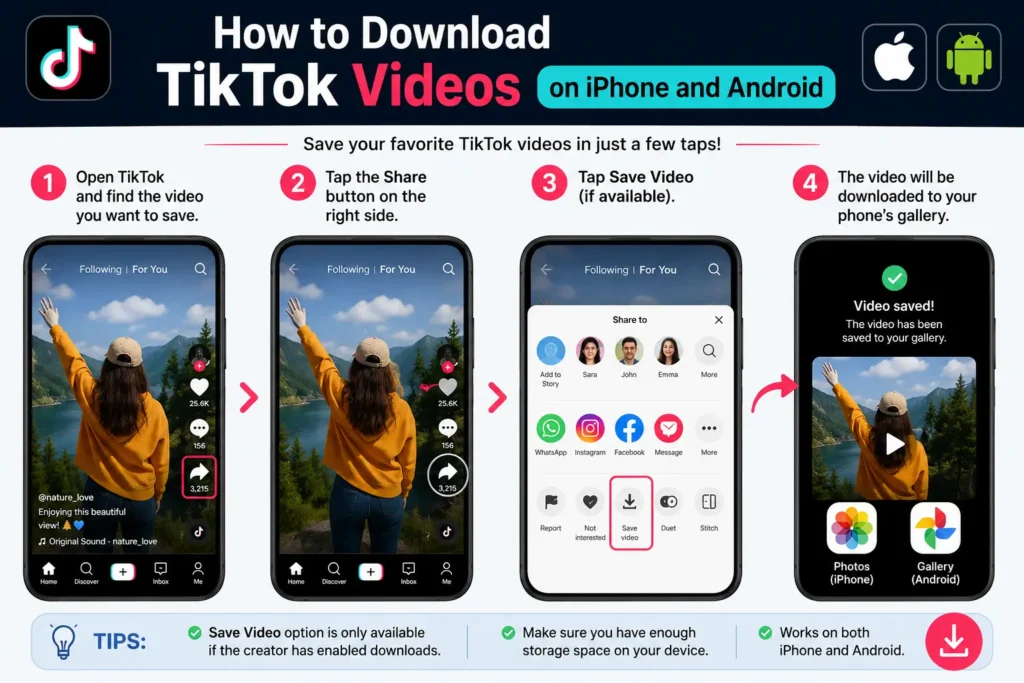
For most users, the built-in TikTok method is the simplest option.
Step 1: Open TikTok
Launch the TikTok app on your iPhone or Android phone and find the video you want to save.
Step 2: Open the Share Menu
Tap the Share button on the video. TikTok will display the sharing options available for that particular post.
Step 3: Look for “Save Video”
If the creator has allowed downloads, you should see a Save Video option.
Tap it to start the download.
Step 4: Check Your Device
Once the download finishes, the video should be available through your phone’s normal photo or video storage area, depending on your device and operating-system permissions.
This is the most straightforward way to download TikTok videos on iPhone or Android because you are using TikTok’s own functionality rather than a third-party service.
Why the Save Video Option May Be Missing
You may not see the download button for every TikTok post.
TikTok lets creators control their download settings. When downloads are disabled, other users cannot directly download the creator’s videos through TikTok. TikTok also notes that private accounts have downloads turned off by default, and accounts belonging to users under 16 have the setting disabled by default as well.
So, if you are thinking, “I can’t download TikTok,” the problem may not be your phone. The video’s download permission may simply be disabled.
How to Download a TikTok Video on PC
Downloading or saving a TikTok video on a computer can be useful when you want to work with your own content, watch a video offline, or store an authorized copy.
Method 1: Use TikTok’s Available Download Option
Open TikTok in your desktop browser and navigate to the video.
Look for the available sharing or download controls. Depending on the post and TikTok’s current interface, the options you see may differ from those in the mobile application.
When TikTok provides a download option, use that official option rather than relying on an unknown third-party website.
Method 2: Save Your Own Video From Your Original File
For videos you created yourself, the safest approach is often to keep the original video file on your computer or transfer it from your phone.
This gives you a higher-quality source and avoids unnecessary reprocessing.
For example, suppose you publish a 1080p video on TikTok. Your original editing file may contain the cleanest version of that video. Keeping that original file is generally more useful than downloading your own post again.
Method 3: Use the Video URL for Reference
You can also copy the TikTok video link when you need to bookmark, share, or reference a post later.
A TikTok video URL is not the same thing as a downloaded video file. The URL points to the TikTok post, while a download creates a local copy when the platform permits it.
How to Download a TikTok Video With a Link
The phrase download TikTok video with link usually refers to a workflow where a person copies a TikTok video URL and pastes it into an online downloader.
The basic process used by many third-party services is:
- Open TikTok.
- Find the video.
- Tap Share.
- Choose Copy link.
- Open a compatible downloader.
- Paste the TikTok video link.
- Follow the site’s available download instructions.
However, this method requires more caution than TikTok’s built-in download feature.
Third-party websites are not the same as TikTok’s official download system. Their features, security, availability, advertising, and privacy practices can change. Avoid services that ask for your TikTok password, require unnecessary account permissions, or attempt to install unknown software.
You should never need to provide your TikTok login credentials merely to save a publicly accessible video link.
How to Download TikTok Videos Without Watermark
Download TikTok without watermark and download TikTok video no watermark are common searches because people sometimes want a cleaner version of a video.
There is an important distinction here: TikTok’s official download feature does not mean that every available download will be a watermark-free copy. A third-party tool may advertise no-watermark download, but that is a separate service rather than a universal TikTok feature.
Before using any third-party TikTok downloader, consider why you need the clean copy.
If it is your own video, keeping the original edited file is normally the better solution.
If it is someone else’s video, removing identifying elements and reposting it can create copyright or attribution problems. TikTok’s intellectual-property policy states that users are expected to respect copyright and other intellectual-property rights, and using another person’s copyrighted content without appropriate authorization or a legally valid reason may violate TikTok’s policies.
A watermark-free file also does not automatically give you permission to republish the content.
Can You Download Any TikTok Video?
No. Download availability depends partly on the creator’s settings.
TikTok provides a Video downloads setting that allows eligible creators to control whether others can download their videos or photos. When the setting is turned off, people cannot download the creator’s existing or future content through TikTok’s download function. TikTok also says that files already downloaded while the setting was enabled can remain on another person’s device even after downloads are later disabled.
This explains why one TikTok may have a Save Video button while another does not.
What Happens When Download Is Disabled?
When a creator disables downloads:
- The direct download option may not appear for viewers.
- You can still share the post using a TikTok link.
- Previously downloaded copies can remain on devices where they were already saved.
Therefore, a missing download button does not necessarily indicate an app error.
Why Can’t I Download TikTok Videos?
Several common reasons can explain the problem.
The Creator Disabled Downloads
This is one of the most likely explanations. TikTok allows creators to control their download settings.
The Account or Post Has Restrictions
Some account and privacy settings can affect download availability.
Your TikTok App Is Out of Date
An outdated app can sometimes display a different interface. Check the App Store or Google Play for an available TikTok update.
Your Phone Has Limited Storage
Even when a download starts successfully, insufficient storage can prevent files from being saved.
Permissions Are Restricted
Your device may not have granted TikTok the permissions it needs to save media.
A Temporary App Problem
Closing TikTok, reopening it, and checking the same post again can help determine whether the problem is temporary.
How to Troubleshoot TikTok Download Problems
When you can’t download TikTok, work through the simplest checks first.
First, test another public video. If another video shows Save Video, the issue is probably related to the original post rather than your device.
Next, update TikTok to the latest available version.
Then check your available storage and make sure TikTok has the appropriate media permissions on your phone.
You can also restart the app or device.
If the Save Video option remains missing only for specific videos, the creator’s download settings are a likely explanation.
Can You Download More Than 200 TikTok Videos?
TikTok does not provide a universal rule saying that every user can download an unlimited number of videos. Download behavior can depend on the app, device, available storage, post settings, and other platform limitations.
If you need to archive a large number of your own videos, it is better to maintain organized copies of your original files instead of relying entirely on repeated downloads from TikTok.
For example, a creator with 200+ videos could store original MP4 files in clearly named folders such as:
2026 > TikTok > Tutorials > August
This makes finding and reusing content much easier.
TikTok to MP4 Download: What Does It Mean?
A TikTok to MP4 download means saving a TikTok video as an MP4-compatible video file.
MP4 is widely supported by phones, computers, browsers, editing applications, and media players, which makes it a common format for video storage.
However, simply seeing “MP4” advertised by an online TikTok downloader does not tell you whether the service is trustworthy or whether you have permission to reuse the downloaded content.
Always distinguish the technical file format from the rights associated with the video.
How to Save TikTok Videos Safely
A few simple practices can reduce problems when using a TikTok video downloader.
Use official options first. TikTok’s own download function is preferable when it is available.
Avoid password requests. Do not enter your TikTok credentials into an unfamiliar downloading website.
Check what you are downloading. A video being publicly visible does not automatically mean it is free to reuse.
Respect the creator. Give appropriate credit when using content in situations where you have permission to reuse it.
Keep original files. For your own videos, preserve the source file instead of repeatedly downloading compressed versions.
Rapid Tool Plus for TikTok and Content Creation
Readers who are working with TikTok content can also explore Rapid Tool Plus, which provides TikTok hashtag generator, TikTok caption generator, social media tools, creator tools, and other free online tools for content creation. For example, its TikTok Hashtag Generator can help creators develop relevant hashtag ideas after preparing a video, while the TikTok Caption Generator can help with accompanying post text. The wider platform also includes SEO tools, social media generators, online generators, and other tools that can be useful when publishing and optimizing content across different platforms.
Best Method for TikTok Video Download
The best method depends on what you are trying to accomplish.
| Situation | Best approach |
| Save an available TikTok video | Use TikTok’s built-in Save Video option |
| Download your own content | Keep the original video file |
| Save a video on iPhone | Use TikTok’s available download feature |
| Save a video on Android | Use TikTok’s available download feature |
| Work with TikTok on PC | Use official options or your original source file |
| Download without watermark | Check whether you own or have permission to use the content before using a third-party method |
| Download option missing | Check creator settings and troubleshoot the app |
Important Copyright and Privacy Considerations
Downloading a video and having the right to redistribute it are two different things.
TikTok’s intellectual-property policy explains that copyright protects original works such as videos and music and that unauthorized use of copyrighted content can violate applicable rules. The policy also recognizes that copyright exceptions can vary by country and circumstances.
For that reason, downloading a video for personal offline viewing is a different situation from downloading it, removing attribution, and uploading it to another platform as your own work.
Before republishing downloaded content, make sure you have the necessary permission or that your intended use is otherwise legally permitted.
Final Takeaway
The simplest way to download video TikTok content in 2026 is to use TikTok’s built-in download option when it is available. On iPhone and Android, open the video, tap Share, and look for Save Video. On PC, available options can differ, so using TikTok’s own features or keeping your original files is the safer approach.
A missing download button often means the creator has disabled downloads rather than there being a problem with your phone. Searches such as download TikTok video no watermark, download TikTok video with link, and TikTok to MP4 download usually refer to third-party workflows, so security, privacy, copyright, and permission should be considered before using them.
For your own TikTok content, maintaining original video files is usually the most reliable long-term solution.
Frequently Asked Questions
How do I download TikTok videos?
Open the TikTok video, tap Share, and select Save Video when the option is available. The download option depends on the creator’s settings.
How do I download TikTok videos on iPhone?
On iPhone, open the TikTok video, tap Share, and choose Save Video if the creator allows downloads. The saved file should then be available through your device’s media storage.
How do I download TikTok videos without a watermark?
TikTok’s built-in download feature should be treated separately from third-party services that advertise no-watermark downloads. Before removing or changing attribution, make sure you own the content or have permission to use it.
Why can’t I download TikTok videos?
The creator may have disabled downloads, your account or device may have restrictions, or the TikTok app may need updating. TikTok specifically allows creators to control the Video downloads setting.
How do I download a TikTok video with a link?
You can copy the video’s TikTok URL through the Share menu. Some third-party online services accept the URL for downloading, but you should evaluate their privacy and security practices and only reuse content you are authorized to use.
Can I download more than 200 TikTok videos?
There is no universal guarantee that every account can download an unlimited number of videos. For large collections of your own content, keeping organized copies of the original files is generally more dependable than repeatedly downloading posts from TikTok.