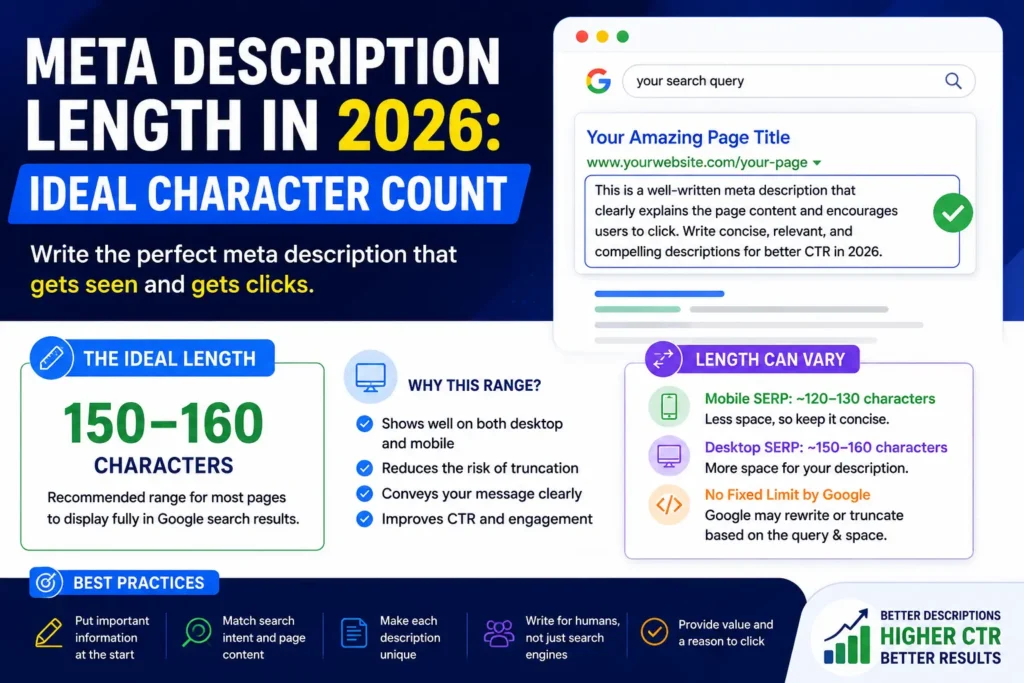
The ideal meta description length in 2026 is not a strict character limit set by Google. Google states that there is no fixed maximum length for a meta description, but search-result snippets can be truncated to fit the available space on the device. Google also says snippets are primarily generated from the page content and may use the meta description when it provides a more accurate summary.
That changes how you should think about SEO meta descriptions. Instead of chasing one supposedly perfect number, write a clear, relevant description that communicates the page’s value early. As a practical editorial target, many SEO teams still aim for roughly 150–160 characters, but this should be treated as a writing guideline rather than a Google requirement.
For anyone working on meta description optimization, the real goal is simple: make the important message visible before Google or the search interface needs to cut it off.
Is there a Google character limit for meta descriptions?
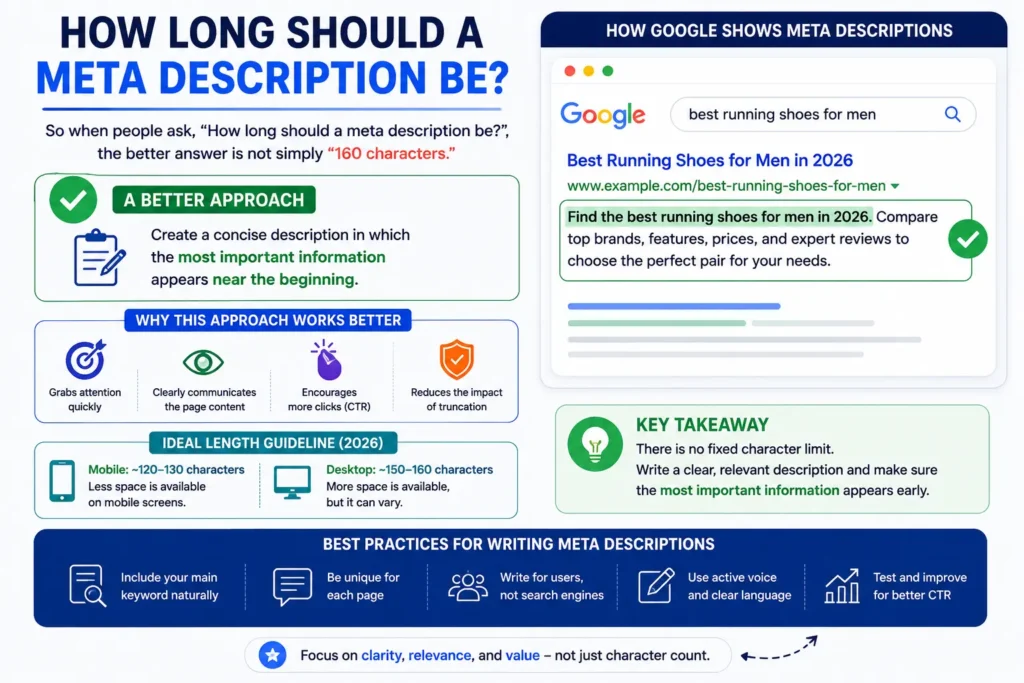
No. Google explicitly says that there is no limit on how long a meta description can be. The limitation users notice comes from the search-result snippet, which can be shortened according to the available device width.
This is an important distinction:
| Element | What controls the length? |
| Meta description HTML | No fixed Google character limit |
| Google search snippet | Display space and Google’s automated systems |
| Character count | Useful writing guide, not a hard rule |
| Pixel width | Can affect how much text is visible |
| Desktop vs. mobile | Display can vary |
So when people ask, “How long should a meta description be?”, the better answer is not simply “160 characters.”A better approach is to create a concise description in which the most important information appears near the beginning.
The practical target for 2026
Although Google does not publish a universal character limit, 150–160 characters remains a useful practical range for many pages.
Why use it?
Because a short description is easier to keep focused, and it increases the chance that the central message appears before truncation. However, treating 160 as a hard ceiling can lead to awkward editing.
For example:
Too long and unfocused:
Learn everything about choosing, writing, optimizing, testing, and improving meta descriptions for SEO, including advanced strategies, examples, best practices, tools, and more.
More focused:
Learn the ideal meta description length, how Google displays snippets, and practical SEO tips for writing concise, relevant descriptions.
The second version gives the reader a clear reason to visit without trying to communicate the entire article in one sentence.
The point is not to hit a specific number at all costs. The point is to make every word useful.
Why character count is only part of the story
One of the biggest misunderstandings around meta description character count is assuming every character occupies the same amount of visual space.
They do not.
Google’s search interface works with available display space, which means pixel width can matter as much as the raw number of characters. A description containing narrow characters may visually occupy less space than another description with wider characters, even when both have a similar character count.
That is why a character-based target can help with editing, but it cannot guarantee exactly where a snippet will end.It also explains why copying a meta description from one page and assuming the same visual result elsewhere is unreliable.
Google does not always show your meta description
This is another point that matters more than the exact character count.Google says snippets are primarily generated from the content on the page itself. It may use the meta description when that description provides a more accurate representation of the page than the available page content.
As a result, writing a technically tidy 155-character description does not guarantee that Google will display it exactly as written.Google may show different snippets for different searches because the system attempts to highlight content that is particularly relevant to the user’s query.
This means a good meta description should still be valuable even when Google chooses not to use it word-for-word.
What makes a strong meta description in 2026?
Length matters, but relevance matters more.
A useful meta description should accurately summarize the specific page and help the searcher understand what they will find after clicking.
1. Put the main value early
Do not hide the main benefit at the end.
For a guide about website migration, for example:
Learn how to plan a website migration, protect important URLs, and reduce common SEO problems during the move.
The reader immediately knows what the page covers.
2. Match the search intent
Your description should reflect the reason someone searched.If the query is informational, explain what the reader will learn.If it is transactional, highlight useful product or service information.If it is a how-to query, make the practical outcome clear.
A page targeting “how long should a meta description be” should not use a vague description such as:
SEO tips and helpful information for improving your website.
That is too broad. It does not tell the searcher what the page actually answers.
3. Make each description page-specific
Google recommends creating unique descriptions for individual pages rather than reusing the same description across a site. Similar descriptions can be unhelpful when different pages appear in search results.
For a website with hundreds of URLs, this does not mean every description must be manually written from scratch. Google notes that programmatically generated descriptions can be appropriate for large, database-driven sites when they are accurate, readable, diverse, and based on page-specific information.
4. Avoid keyword strings
A meta description is not a place to dump variations of your target term.
For example:
Meta description, SEO meta description, meta description length, meta description tips, best meta description SEO.
That wording gives the searcher almost no useful information.Google specifically advises against descriptions made up of long strings of keywords because they do not clearly explain the page and are less likely to be displayed as the snippet.
A better way to think about mobile vs. desktop SERP display
People often search for one exact number because they assume desktop and mobile have fixed, predictable snippet lengths.In reality, search-result presentation depends on the space available and Google’s systems. The same description can therefore display differently across devices, layouts, and searches.
That makes mobile vs. desktop SERP differences useful to remember, but not something you should solve with separate hard character limits.
Instead, use a simple rule:
Write the essential message first.
A strong structure is often:
Topic + useful detail + reason to click
For example:
Discover the ideal meta description length for SEO, how Google handles snippets, and practical ways to write concise descriptions.
The first part establishes relevance. The middle adds useful detail. The ending gives the searcher a reason to continue.
Should you aim for 155 characters?
You can, but do not treat 155 as a rule.A 155-character description that reads naturally is usually better than a 145-character description that removes important context just to stay under an arbitrary number.Likewise, a useful description can sometimes be somewhat longer than 160 characters if the extra wording improves clarity. Google can truncate the snippet when needed.
A practical workflow is:
- Write the description naturally.
- Put the most important information near the beginning.
- Remove unnecessary words.
- Check the character count as an editing aid.
- Review whether the description still accurately represents the page.
This keeps meta description best practices focused on users rather than a number.
Examples of effective meta description lengths
Here are a few examples that show how different page types can be handled.
Blog post
Learn the ideal meta description length for Google, how snippet truncation works, and practical SEO tips for writing better descriptions.
Product page
Explore a lightweight waterproof hiking backpack with adjustable straps, multiple storage pockets, and a comfortable fit for day trips.
Service page
Get a technical SEO audit covering crawlability, indexing, site speed, metadata, internal links, and other key website issues.
Homepage
Rapid Tool Plus provides practical online generators and calculators to help with SEO, content, social media, and everyday tasks.
Notice that none of these descriptions depends on an exact formula. Each one tells the searcher what the page offers.
What about the “ideal title tag length”?
Meta descriptions and title tags are often discussed together, but they should not be treated as having the same rules.
Your ideal title tag length is a separate consideration from meta description length. Both need to communicate the page topic clearly, but Google generates search-result title links and snippets through automated systems, and the displayed result may not always exactly match the HTML elements you provide.So do not shorten a good meta description simply because you are trying to fit it into the same mental model as a title tag.Think of them as two different pieces of the search-result presentation:
Title: quickly identifies the page.
Description: adds context and helps explain why the result is relevant.
Meta description optimization: a simple editing test
Before publishing, read your description as if you were seeing it among competing search results.
Ask:
Can I understand the page in one glance?
Then check:
Does the opening contain the most important information?
And finally:
Would this still make sense if Google selected another part of the page as the snippet?
This is more useful than checking the character counter repeatedly.A good description should accurately summarize the page, stay specific, avoid repetitive keywords, and communicate useful information efficiently. Google recommends descriptions that are descriptive, page-specific, and relevant to the content.
Rapid Tool Plus for writing and refining meta descriptions
When you need help creating concise page descriptions, Rapid Tool Plus offers a Meta Description Generator that can help turn page information into focused description ideas. You can use it as a free meta description generator for drafting, or as an SEO meta description generator when refining descriptions around a page’s search intent and content. The tool can also support website meta description creation by giving you a starting point to review, edit, and align with the actual page. The goal should still be to create a clear, relevant description that accurately represents the page rather than simply targeting a specific character count.
Common mistakes to avoid
Chasing an exact number
There is no Google rule that says every meta description must be exactly 150, 155, or 160 characters. Those figures are practical conventions, not fixed limits.
Writing for search engines instead of readers
A description packed with keyword variations may look optimized but can be less useful to the person deciding whether to click.
Using the same description on many pages
Different pages usually deserve different descriptions. Google recommends making descriptions unique and specific wherever practical.
Making the description too vague
“Learn more about our services” says almost nothing.
A better description explains what the page contains and who it is for.
Assuming Google will always use it
Google can generate snippets from page content and may choose a different passage when it considers that more relevant to the search.
The right approach to meta description length in 2026
The safest way to approach seo meta description length is to stop thinking about it as a strict limit.
Google’s current documentation says there is no maximum length for the meta description itself. Instead, snippets may be truncated to fit the device width, and Google may choose page content rather than the supplied meta description.That means a practical target such as 150–160 characters can still be useful for drafting, but it should never override clarity.
Your priority should be:
accurate topic → strong relevance → important information early → concise wording → natural language
That approach also makes your description more resilient when Google generates a different snippet.
Final takeaway
The ideal meta description length in 2026 is not a fixed Google character limit. Google allows meta descriptions to be any length, while search-result snippets can be shortened based on available display space.
For practical SEO writing, around 150–160 characters is a reasonable target, but the quality of the description matters more than hitting an exact number. Write unique, relevant descriptions, put the key message early, avoid keyword stuffing, and make sure the description accurately reflects the page.
A strong meta description is not the longest one that fits. It is the shortest one that gives the searcher a clear and useful reason to understand the page.
Want More Meta Description Examples?
Now that you know how meta description length works in 2026, see practical examples you can use for different types of pages. Read our guide to 25 Meta Description Examples to Boost CTR in 2026 for real-world examples and ideas for writing clearer, more compelling search snippets.
FAQs
Is 160 characters a strict meta description limit?
No. Google does not set a fixed maximum character limit for meta descriptions. The search-result snippet may be shortened based on the available space and Google’s systems.
Can a meta description be longer than 160 characters?
Yes. A meta description can be longer than 160 characters. However, keeping the most important information near the beginning is a practical way to reduce the impact of possible truncation.
Does meta description length affect Google rankings?
Meta descriptions are not a direct Google ranking factor. Their main purpose is to summarize the page and potentially influence how the search result is presented and how users respond to it.
Why does Google sometimes show different text instead of my meta description?
Google may generate a snippet from the page’s visible content when it believes that text better matches the user’s search query. As a result, the displayed snippet may differ from the description in your HTML.
Should every page have a unique meta description?
For important pages, unique and specific descriptions are recommended. A page-specific description gives search engines and users a clearer understanding of what makes that page different from other pages on the site.
Should I optimize meta descriptions for mobile and desktop separately?
Usually, there is no need to create separate descriptions solely because of device differences. Instead, write a concise description with the most important information near the beginning, because search-result displays can vary by available space.