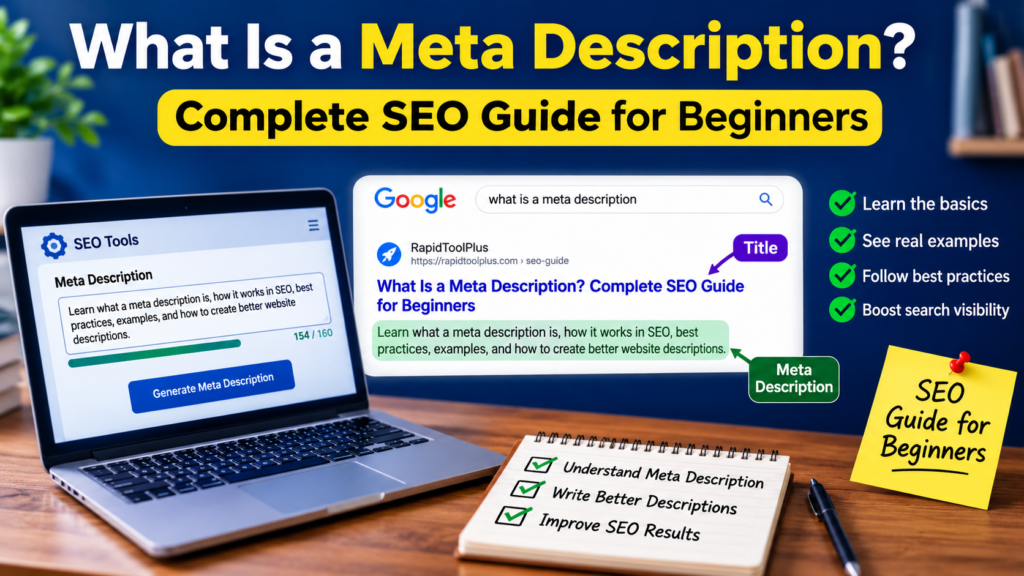
A meta description is a short piece of HTML text that summarizes what a page is about. It sits in the <head> of your page and doesn’t appear anywhere on the visible page itself — it only shows up in places like Google’s search results, social media link previews, and other listings where a short summary is useful.
If you’ve ever searched something on Google and read the two or three lines of grey text under the blue link before deciding whether to click, you’ve already seen what is a meta description in action — or, at least, that’s what it’s supposed to be. As you’ll see below, Google doesn’t always use the exact text a website writes, and understanding why is the difference between writing a meta description that actually shows up and writing one that gets quietly ignored.
What Is a Meta Description? (Simple Definition)
A meta description is an HTML <meta> tag placed inside a webpage’s <head> section. It looks like this:
<meta name=”description” content=”Learn how to write a meta description that improves your click-through rate in search results.”>
That’s it — no styling, no visible placement on the page, no interaction with the reader at all until it shows up in a search engine or a shared link. Its entire job is to describe the page accurately enough that a search engine can use it, and persuasively enough that a person reading it decides to click.
People sometimes look this up as “description meta,” “page description,” or “page meta description” — these all refer to the exact same tag. There’s no functional difference between the terms; it’s just a matter of phrasing.
What Does a Meta Description Do? (Its Actual Purpose)
A meta description does three things:
- Gives context in search results. It’s the preview text under your title and URL that helps someone decide if your page answers their question.
- Controls how your link looks when shared. Many platforms — Slack, WhatsApp, Facebook, LinkedIn — pull the meta description as the preview text when a link is pasted or shared.
- Sets expectations before the click. A description that accurately represents the page reduces bounce rate, because the person who clicks already knows roughly what they’re getting.
What it does not do is directly boost your position in Google’s rankings — more on that below.
Meta Description vs. Meta Title vs. Meta Tag — What’s the Difference?
These three terms get mixed up constantly, so it’s worth separating them clearly:
- Meta tag is the umbrella term. It refers to any <meta> element in a page’s HTML — there are dozens of them, covering everything from character encoding to viewport settings.
- Meta title (also called the title tag) is the clickable blue headline in search results. It’s a ranking factor and has its own separate tag: <title>.
- Meta description is specifically the summary tag described above. It is one type of meta tag, but not every meta tag is a meta description.
If you’re setting up both, a meta title generator and a meta description generator solve two different problems — the title earns the click from the search engine’s ranking algorithm, and the description earns the click from the human reading the results.
Where Does a Meta Description Appear?
- Google and Bing search results — as the summary text beneath the title and URL.
- Social share previews — when a link is pasted into Facebook, LinkedIn, X, or messaging apps, most platforms pull the meta description (or a specific Open Graph description tag) as the preview text.
- Internal site search and RSS feeds — some CMS and feed readers also display it.
It never appears in the body of the page itself. If you don’t see it anywhere when you view a live page, that’s expected — you’d only find it by viewing the page’s source code.
Is a Meta Description a Ranking Factor? Why It Still Matters for SEO
No. Google has stated directly that meta descriptions are not used to determine rankings, and no credible SEO source disputes this.
What they do influence is click-through rate (CTR) — and CTR has a real, indirect relationship with performance. A page sitting in the same position but earning more clicks because of a compelling, accurate description tends to build more traffic, more engagement signals, and more opportunities to convert. In other words: it won’t move you from position 8 to position 2, but it can meaningfully change how many of the people who see your listing actually visit it.
This is also where meta descriptions connect to the rest of your SEO work. A well-optimized page still needs solid on-page fundamentals — which is why keyword research matters before you even get to writing the description. If the page itself doesn’t match search intent, no meta description will save its CTR long-term.
Meta Description Character Limit: How Long Should It Be?
This is one of the most searched — and most misunderstood — parts of the topic. Here’s what’s actually true:
There is no official, fixed character limit. Google doesn’t truncate based on a specific character count. It truncates based on pixel width — how much horizontal space the text takes up in the search results, which varies by device, font, and even the characters used (a “W” takes more space than an “i”).
That said, in practice:
- Desktop: descriptions that survive intact are usually somewhere around 150–160 characters.
- Mobile: the visible space is often smaller, so descriptions get cut off sooner — sometimes closer to 120 characters.
Practical Meta Description Rules to Follow
- Put your page’s core value in the first ~120 characters — that’s the part most likely to survive truncation on any device.
- Don’t stretch a description to hit a specific number. A short, accurate description beats a padded one every time.
- Preview your title and description in a SERP-preview tool before publishing, since character count alone won’t tell you exactly where it gets cut off.
- Never duplicate the same description across multiple pages — Google’s own guidance specifically flags duplicate descriptions as something to avoid, since they don’t help differentiate your pages in search.
For a deeper breakdown of exact character counts across devices, see this dedicated length guide.
How Google Actually Decides What to Show
This is the part most beginner guides skip, and it’s the reason a well-written meta description sometimes doesn’t appear in search results at all.
Per Google’s own documentation:
- Snippets are primarily generated from the page’s visible content, not from the meta description tag.
- Google will use your meta description only when it represents the page more accurately than the surrounding text does.
- Different search queries can trigger different snippets for the same page, because Google tailors what it shows to match what was actually typed into the search bar.
You can influence — though not fully control — this behavior with two tags: nosnippet (blocks snippets from showing at all) and max-snippet:[number] (caps how long a snippet can be). But there’s no tag that forces Google to always display your exact wording.
The practical takeaway: writing a strong meta description doesn’t guarantee it appears, but it makes your tag a strong candidate and gives Google better material to work with even when it decides to pull from elsewhere on the page.
Meta Description for a Blog Post vs. a Website vs. a Product Page
The right approach changes depending on what kind of page you’re writing for.
For a blog post: Summarize the specific problem the article solves. Someone searching “what is a meta description” wants a definition, not a sales pitch — match that intent directly.
For a website homepage: A homepage description needs to summarize the entire site, not one article. It should answer: what does this site offer, who is it for, and what makes it different? A vague line like “Welcome to our website” answers none of those questions. If you’re short on ideas, a homepage description generator can produce a usable first draft — but it should always be edited to reflect your actual site rather than published as-is.
For a product or service page: Be concrete. Name the specific feature, price range, or use case rather than generic marketing language like “the best solution for all your needs.”
Step-by-Step: How to Write a Meta Description
- Identify the page’s actual purpose — is it an article, a product, a category, a tool, or a homepage?
- Match search intent. Someone typing “what is a meta description” wants an explanation. Someone typing “meta description generator” wants a tool, not an essay.
- Summarize the core value in one or two sentences.
- Add specific, page-level details — a number, a feature, a scope, a date — instead of vague marketing language.
- Cut anything repeated or generic, then re-read it against the actual page to make sure it doesn’t overpromise.
Meta Description Examples: Weak vs. Strong
Weak: “We offer many different services for all your needs. Contact us today to learn more!” This could describe almost any business on the internet — it gives Google and the searcher nothing specific to work with.
Stronger: “Compare wireless headphones by battery life, noise cancellation, and price, using results from independent testing.” This names exactly what’s on the page and signals it’s substantive, not filler.
Weak (product page): “Buy the best shoes online now.”
Stronger (product page): “Waterproof hiking boots for rocky terrain, sizes 6–13, with free returns within 30 days.”
Want more real examples to model yours after? This collection of meta description examples breaks down what works across different page types.
Common Meta Description Mistakes to Avoid
- Duplicating the same description across many pages. This is one of the most common — and most explicitly discouraged — mistakes, since it gives search engines no way to distinguish your pages from each other.
- Keyword stuffing. A description that reads like a list of search terms rather than a sentence looks spammy and is less likely to be used by Google at all.
- Promising something the page doesn’t deliver. This increases bounce rate and erodes trust in your listings over time, even if it briefly boosts clicks.
- Leaving it blank. Google will auto-generate one, and the result is often an awkward, out-of-context sentence fragment pulled from the page.
- Chasing an exact character count. There’s no bonus for landing precisely on 158 characters if the sentence reads unnaturally to get there.
Should You Use a Meta Description Generator?
For a handful of pages, writing manually is usually fine. But for a larger site — hundreds of product, category, or blog pages — writing every description by hand becomes a real bottleneck. That’s where a meta description generator is genuinely useful: it gives you a fast first draft based on your title, topic, or key page details.
The tradeoff is that generated text tends to stay generic until a person who actually understands the page edits it. Treat any generator output as a starting point, not a finished tag — the editing step is what turns a generic draft into something that reflects your specific page and earns the click.
If you want to compare options first, this roundup of AI meta description generators covers the best tools available in 2026.
Final Takeaway
A meta description won’t move your rankings on its own, but it’s one of the few pieces of on-page SEO you fully control that directly shapes whether someone clicks through to your site. Write it to accurately represent the page, keep it unique across your important URLs, and lead with the core value in the first 120 characters. Google may still choose a different snippet for a given query — that’s expected and normal — but a clear, honest description gives it the best possible material to work with either way.
If you’re optimizing a large site, start with your highest-traffic pages, run them through a free meta description generator for a first draft, and edit each one so it actually reflects the page it’s describing.
Bookmark this complete SEO guide to meta descriptions for beginners so you can come back to it whenever you’re writing one from scratch.
Frequently Asked Questions
What is a meta description used for?
It’s used to summarize a webpage in search results and social share previews, giving people enough context to decide whether to click through.
What is a meta description tag?
It’s the HTML <meta name=”description” content=”…”> element placed in a page’s <head> section. “Meta description” and “meta description tag” refer to the same thing.
Does a meta description affect Google rankings?
No. It is not a ranking factor. Its effect on SEO is indirect, through click-through rate rather than position.
Does Google always show my meta description?
No. Google primarily builds snippets from a page’s own content and only substitutes your meta description when it’s a more accurate match for the specific search query.
What’s the ideal meta description length?
There’s no official fixed limit, but roughly 150–160 characters is a practical target for what typically survives truncation on desktop, with mobile often showing less.
Should every page have a unique meta description?
Yes, for any page you want to perform well in search. Duplicate descriptions across URLs make it harder for search engines — and users — to tell your pages apart.
What’s the difference between a meta description and a meta title?
The meta title is the clickable headline in search results and is a ranking factor. The meta description is the summary text beneath it and is not a ranking factor, though it influences whether people click.